Using Kona Risk for Risk Register Collaboration
When you create risk events in Acumen, you may want others to review them and to provide input about the risk levels and impacts.
You now have the option to publish your risk register and risk scoring matrix to Kona Risk; an Acumen Add-on that uses Kona's cloud-based social collaboration and productivity features.
When you publish a risk register to Kona Risk, Kona creates a space for that risk register. A new space is created for each risk register that you publish to Kona Risk. All the risks that were in the risk register are published to the Kona space and can be viewed on the Risks tab. You can click on a risk and see a complete risk breakdown, including the values that the risk register owner entered for probability, as well as schedule and cost impacts.
As the owner of the Kona space, you can invite people to the space to add comments and to share their opinions about the risks. For example, you may have listed a very high risk probability whereas others may feel the probability is a medium risk.
In addition, you can use the other Kona tabs, such as the Conversations and Tasks tabs, to discuss the risks and to add tasks for others to complete. For example, you may add a task requiring each person in the space to add their own scores to the risk items.
As with other Kona spaces, you have the option to set up space templates. For example, you may want to create a template that includes standard tasks relating to risk register. When you publish to Kona Risk, you can select the template which Kona then uses when creating the space.
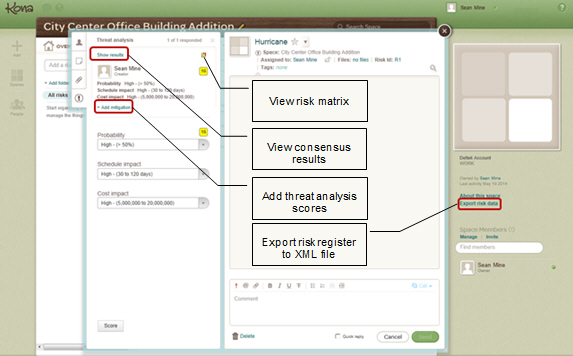
After everyone has provided feedback, you can export the risk register to an XML file format which can then be imported back into Acumen. You can then compare your original risk register with the collaborative version and make any needed adjustments.
Kona Business Token
The Kona Business Token includes three fields (Redirect URL, Client ID, and Client Secret) and is used to link Acumen to Kona. You will need this information if you need to manually enable Kona Risk in Acumen.
Start Using Kona Risk
After you create the Kona Risk space, you can invite people to the space to start conversations and get input on the risk register.
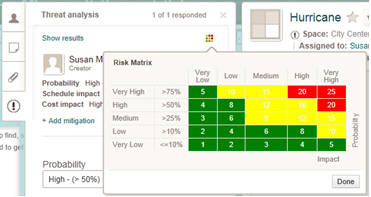
Risk Matrix Example
Kona Risk Example
Importing a Risk Register from Kona Risk back into Acumen
When you import a risk register from Kona Risk back into Acumen, the values and scores are brought from Kona Risk into the Acumen Risk Register. Existing risk event mitigation duration and cost data is maintained. Existing mitigation steps are combined into a single step and the mitigation step Duration/Cost displays the sum total of all of the original individual steps. Any new risk events that you created after exporting the risk register are maintained when you import the register back into Acumen.